


What Is a Bracket Order?
A bracket order packages three orders into one ticket: the entry that opens the position, an upside limit order that takes profit, and a downside stop order that caps the loss. The two exit orders are wired together so when one fills, the broker automatically cancels the other.
The name comes from how the exits 'bracket' the entry — one above (the profit-taker) and one below (the stop). You decide all three prices at trade time, then walk away.
Why this matters
Most beginner mistakes happen on the exit, not the entry. Bracket orders force you to think about how the trade ends before it begins — when the emotional pressure of a moving price hasn't arrived yet.
The Three Pieces
1. Entry
- Usually a market order or limit order
- Opens the position
- Triggers the two exit orders when it fills
2. Profit-taker (upside)
- A limit order above the entry
- Sells (or buys to cover) when price reaches your target
- Cancels the stop the moment it fills
3. Stop-loss (downside)
- A stop or stop-limit below the entry
- Closes the position if price drops to your line
- Cancels the profit-taker the moment it fills
What Is an OCO Order?
OCO stands for One-Cancels-the-Other. It's a rule that links two orders so that the moment one fills, the broker automatically cancels the other. OCO is the wiring underneath every bracket order's exit pair, but it's also useful on its own.
You can use a standalone OCO to set up a take-profit and a stop-loss on a position you already own, without placing a new entry. It's the same idea as a bracket without the entry leg.
| Concept | What it does | Use when |
|---|---|---|
| Bracket order | Entry + profit-taker + stop-loss, with the two exits wired as OCO | Opening a new position with the full exit plan baked in |
| Standalone OCO | Pairs two existing orders — one fills, the other cancels | Setting an exit plan on a position you already opened |
Bracket vs OCO, the relationship
A Worked Example
You want to buy a stock currently quoted around $100, with a clear exit plan: take profit at $110, cut losses at $95. Instead of placing three separate orders and remembering to cancel the others manually, you ship one bracket order:
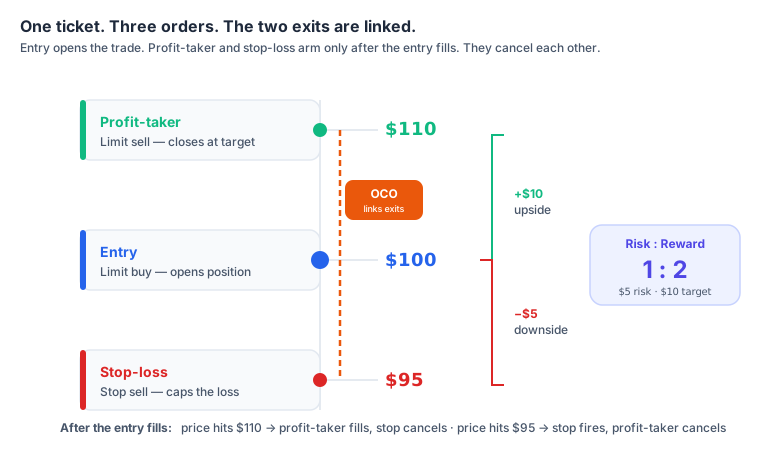
Entry — limit buy at $100
You only want in at the current price or better.
Profit-taker — limit sell at $110
+10% target. Becomes active once the entry fills.
Stop-loss — stop sell at $95
−5% line. Also becomes active once the entry fills, wired to the profit-taker as an OCO.
Three scenarios play out:
Price hits $110 first
- Profit-taker fills
- Stop-loss automatically cancels
- Position closed at the target
Price hits $95 first
- Stop-loss triggers
- Profit-taker automatically cancels
- Position closed at the loss line
Price stays in the range
- Both exits remain open
- You're still in the trade
- Time-in-force decides when they expire
Broker Support Varies
Not every broker offers bracket orders, and the ones that do don't all call them the same thing. The two related concepts you'll see most: OTO (One-Triggers-Other) means a single entry that triggers a *single* follow-up order; OTOCO (One-Triggers-OCO) is the full bracket — an entry that triggers an OCO pair of exits. Some platforms call the full bracket simply 'bracket order'; others use OTOCO. Some only allow them on certain account types or asset classes.
Check your broker's order ticket
Before relying on a bracket order in a real trade, paper-trade it once on your specific broker. The UI, the names, and the exact behavior (e.g. whether the stop becomes a market or limit at trigger) vary platform to platform. StockCram is not affiliated with any brokerage mentioned.
What Bracket Orders Can't Do
- Protect against a gap. A stop is still a stop — see the gap-risk discussion in the stop-loss lesson. Bracketing doesn't change how the stop fills.
- Make the entry a sure thing. If the entry is a limit order and the market never reaches it, the whole bracket sits unfilled. No entry, no exits.
- Adjust dynamically. A bracket's prices are fixed at submission. If you want the stop to ride a rising price, use a trailing stop instead, or build a manual updating habit.
- Replace position sizing. A bracket order tells the broker *when* to exit, not *how big* the position should be. That comes first — see the position-size calculator below.
When Bracket Orders Fit
Bracket orders earn their keep when you have a clear plan you want to commit to before the trade, and don't want a moving price to talk you out of either exit. Defined-risk traders use them. Swing traders use them on positions they can't watch all day. Buy-and-hold investors usually don't need them.
Educational framing, not advice
This lesson explains how bracket and OCO orders work mechanically. Whether you should use them, and at what prices — depends on your situation, goals, risk tolerance, and (often) a tax professional. StockCram doesn't recommend trades.